As I have been completing my first trial projects I have been exporting common outputs - notably the point cloud, the 3D model, and some images. I have always been keen that however complex these are, they must be viewable on the web.
I've experimented with point cloud and model viewing tools and am pretty happy with the results, especially some of the measuring tools. Images are relatively straightforward, but combining the lot into one project gallery with all the dynamic viewing and measuring tools seemed quite important to me.
I'd already got the Potree Point Cloud viewer working, with all of it's clever measuring tools. But I wanted to expand that a bit further too.
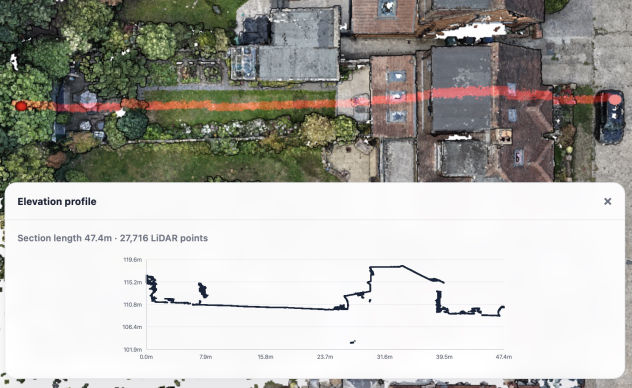
One of the notable tools that I didn't have was the Elevation Profile, which is so effective at showing a cross section of the terrain by just clicking a couple of points. Adding that was a bit fiddly, and actually Claude stumbled here for some reason, so I had to resort to ChatGPT to get the correct code for the elevation profile.
Images, in theory very simple, the web is full of images. But it occurred to me that I was looking at massive orthomosaics that are way too large to view on a website. But of course there are ways to solve this problem.
QGIS has a tool for splitting up large images into thousands of tiny 'tiles' specifically for viewing on the web. Every different level of zoom is split into a number of small files and only the relevant areas are downloaded as you zoom in and out - it's basically how things like Google Maps work.
It was so simple to try it out, although the total number of files it generated was insane - over 100,000 images to represent one large orthomosaic.
Ultimately it worked, but it seemed over the top for me at this point, when I could just reduce the image size a little and convert to JPG to bring it down to a useable size.
I'll revisit the tiled approach another time though!
So, I had the basic ingredients - point cloud, 3D model, orthomosaic, DTM & DSM. Now I wanted a dynamic gallery where I could display all this stuff.
A bit of folder structure thinking and some standardisation of file naming was enough to feed Claude with what I wanted - A gallery that is driven by folders, one folder per project, and in it some or all of the common outputs that I will be generating. Then, once into a project an easy method to switch between the different outputs.
It only took about three minutes, and I had a working gallery. Sure we spent a couple of evenings tweaking the layout and adjusting the functionality, but compared to when (in my younger days) I used to write all the code myself, this was remarkable.
I have to admit that now, if I had to code (and work out how to code) all this stuff myself, then sadly I wouldn't have the time and likely wouldn't bother trying.
Drag & Drop Website Builder